Of pointers and men (1)
the following article was translated into english from the french blog rancune.org. the original article (Des pointeurs et des hommes (1)) gives an introduction to the concept of C pointers. since I'm learning C myself these days and struggling a bit with the concept, I re-read this article and found it clear and enlightening.
i asked the author if they were ok with letting me publish a translation of the article, and they kindly allowed me to do so (thanks again!)
i'll try to find the time to translate the other chapters later this year.
hope you'll enjoy it and learn from it as much as I did!
For most students, the pointer is one of those scary C concepts. And the worst is that I can't even blame them for that: if you have a look at course materials floating around on the web, some are really shitty and the vast majority use vocabulary that's completely over the top. Yet, there's nothing simpler! So sit back, relax, have a cup of coffee and let's see if I can do better than the average teacher!
Everything is memory
Let's start with a very simple program:
#include <stdio.h>

int main(){
	int A;
	A = 42;
	printf("A is %d \n", A);
	return 0;
}
Nothing crazy here: we have asked the computer to allocate a bit of memory, enough to store an int, and have told it that from now on we'll call that integer A. All of that in a single instruction:
int A;
By the way, how many bytes have we reserved? Easy, we just need to ask the machine with the sizeof() operator:
#include <stdio.h>

int main(){
	int A;
	A = 42;
	printf("A is %d \n", A);
	printf("A takes up %ld bytes \n", sizeof(A));
	return 0;
}
$ gcc -o pouet main.c
$ ./pouet
A is 42
A takes up 4 bytes
So A takes up 4 bytes! If we recall that our RAM is just a looooooooooong ribbon of bytes, this simply means that by declaring A, we have decided to use 4 of the bytes of our RAM to store our integer.
A little drawing to nail things down: here's our RAM:
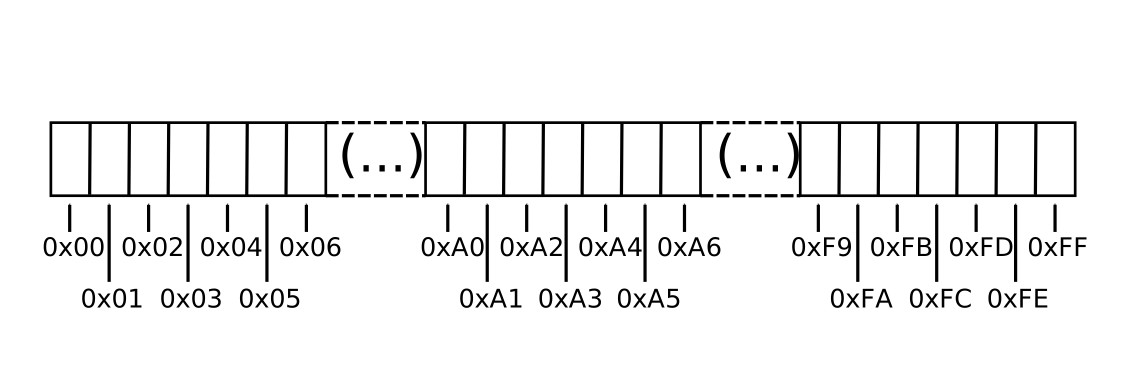
It's made up of one-byte boxes which are numbered. For simplicity, I have shown above a "small" RAM of 256 bytes. The numbers range from 0x00 to 0xff in hexadecimal. In reality, your memory is way bigger, and addresses take up 8 bytes (from 0 to 0xffffffffffffffff) on your nice 64-bit machine :)
Ultimately, declaring our variable A is just choosing four memory boxes (4 bytes) to store the content of A:
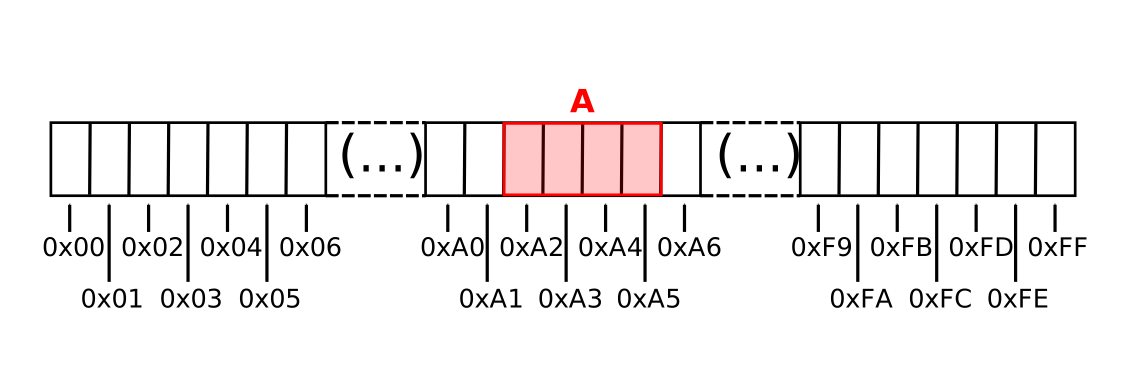
The name of that variable, A, is only there for us poor humans. For the machine, this integer we call A is "the integer stored in box 0xA2 and onward". Or, if you prefer, "the integer stored at address 0xA2".
The address of a piece of data, in the end, is just that : it's the memory box number of the first byte of that data.
The & operator
I know what you're thinking : "alright, that's all very nice, but show me where A is, in practice!". First, let me say that your lack of faith in me saddens me deeply. But since you're asking, we can determine that using the & operator.
This operator allows us to determine the address of a piece of data in memory. A little example?
# include <stdio.h>

int main(){
	int A;
	A = 42;
	printf("A is %d \n", A);
	printf("A takes up %ld bytes \n", sizeof(A));
	printf("A is located at memory address %p \n", &A);

	return 0;
}
$ gcc -o pouet main.c
$ ./pouet
A is 42
A takes up 4 bytes
A is located at memory address 0x7ffdc27a353c
So our variable A has been placed at address 0x7ffdc27a353c in memory... Classy, huh?
I know hex notation might seem confusing, but don't pay attention to that. It's just a way for computer scientists to manipulate numbers in a slightly more condensed manner. I mean, if I tell you that A is at 0x7ffdc27a353c or in box number 140727866242364, it's exactly the same thing! And remember that anyway, your computer only speaks binary in the end!
That said, for now all of that is not very useful. I don't really see how to slip that in a conversation at a cocktail party, and I'm sure you can find something better for your pickup lines :) So let's try to play around with our addresses.
Let's manipulate addresses
So where would we store the address of a variable? Often, the first idea that comes to mind is "well it's just an integer! Let's put that in an int!".
Yes, but no! It's a large integer. Our int, on a PC architecture, is 32 bits, and our addresses are 64. A long int then? Mh, but that's not very portable!
So we decided to create a new type, a type "variable that contains the address of an integer". In C, you write it like this :
int* addr;
The addr variable is a completely normal variable. Only, its type is int*, which means it contains the address of an int.
A pointer is simply that! A variable that contains an address
An example? Ok, since you're asking so nicely:
#include <stdio.h>

int main(){
	int A;
	int *P;

	A = 42;
	P = &A;

	printf("A is %d \n", A);
	printf("A takes up %ld \n", sizeof(A));
	printf("A is located at address %p \n\n", &A);
	printf("P is %p \n", P);
	printf("P takes up %ld bytes \n", sizeof(P));

	return 0;
}
In this little program, we added a variable P which is an int*. Like all variables, P can be filled with the = operator. Here, we stored the address of A with the following line:
P = &A;
We say that "P points to A". Personally, I find that expression quite convoluted. I prefer to say "P contains the address of A". It's simpler, and I find it clearer!
Alright, we talk we talk.. but what if we actually ran it?
$ gcc -o pouet main.c
$ ./pouet
A is 42
A takes up 4
A is located at address 0x7ffe78c958fc

P is 0x7ffe78c958fc
P takes up 8 bytes
As we can see, P, of type int*, takes up 8 bytes. Which is exactly the necessary size to store a memory address. And it does contains 0x7ffe78c958fc, which is indeed the address of A. Visually, our RAM looks like this:
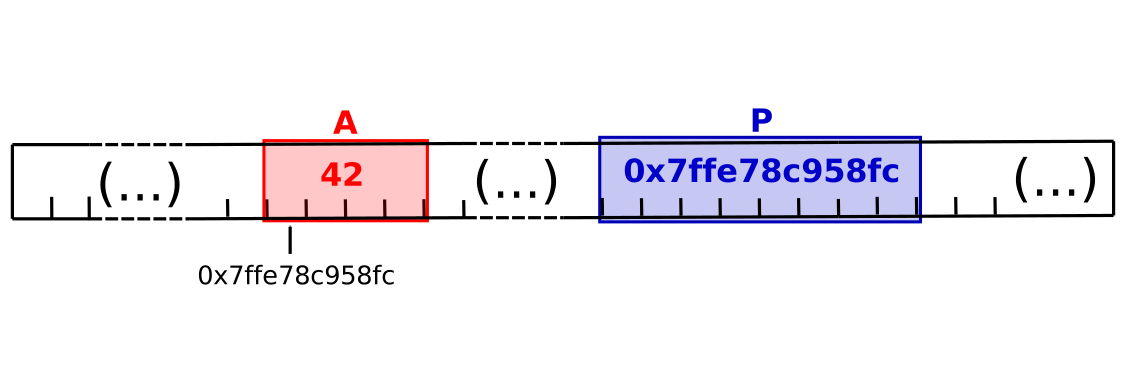
If A had been a double, we would have declared P as a double*, to indicate it contains the address of a double. If A had been an unsigned char, P would have been unsigned char* and so on.. You can create a pointer to any variable, whatever the type!
However, no matter what type P points to, it does not change its fundamental nature : it contains an address (a memory box number if you prefer!).. and so it will always have a size of 8 bytes on this machine!
But is a pointer really a variable like any other?
Yes! Nothing distinguishes a pointer from all the other variables you've been working with from the start. If you have trouble with it, take the drama out of it and tell yourself it's is just a big integer.. a "memory box number"!
But wait.. if it's a variable.. we can ask for its address?????
YES!
In our example, P has to be stored somewhere in memory... so we can use our & operator to get its address:
#include <stdio.h>

int main(){
	int A;
	int *P;

	A = 42;
	P = &A;

	printf("A is %d \n", A);
	printf("A takes up %ld bytes \n", sizeof(A));
	printf("A is located at address %p \n\n", &A);

	printf("P is %p \n", P);
	printf("P takes up %ld bytes \n", sizeof(P));
	printf("P is located at address %p \n", &P);

	return 0;
}
$ gcc -o pouet main.c
$ ./pouet
A is 42
A takes up 4 bytes
A is located at address 0x7ffeea36056c

P is 0x7ffd8a2d2d6c
P takes up 8 bytes
P is located at address 0x7ffeea360570
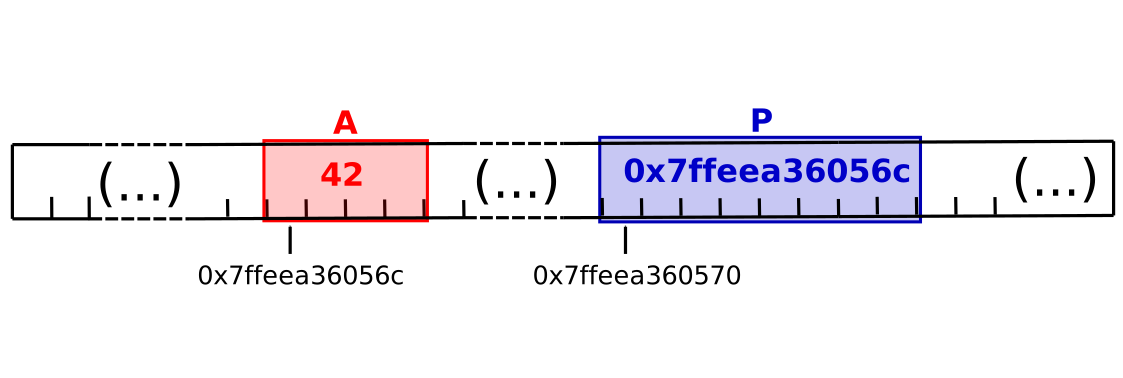
And if I wanted to manipulate the address of P, what would I store it in?
You guessed it : it's the address of an int*, so I'd store it in an int**!
And we can go on like this for quite a while! (I don't even know if there's a practical limit!). However, if you go beyond three or four stars, it probably means your code deserves a second look!
The indirection operator *
On last concept, and I promise I'll leave you alone: the * operator.
It's an operator that allows us to access the data located at the address contained in a pointer. Ok, I know, put like that it's not clear. But rest assured, it's really not complicated at all.
If we go back to the previous example:
int A;
int *P;

A = 42;
P = &A;
P now contains the address of A.
If we type the following instruction:
*P = 69;
Then we're asking to store the value 69 at the address stored in P.
If we break down that process, the computer will:
- Look at
P - Find an address in it
- Store
69at that address
And so.. we've just modified A, and it's in A that 69 is stored!
Watch out, don't confuse this star, which is an operator, with the star used to declare a pointer!!!
I'll let you try this little example to really understand:
#include <stdio.h>

int main() {
    int A ;
    int *P ;

    A = 42 ;
    P = &A ;

    printf("A vaut %d \n", A ) ;

    *P = 69 ;

    printf("A vaut maintenant %d \n", A ) ;
    return 0 ;
}
The rest of the warrior
This is already a lot to take in, and we still have a long way to go. I propose we split this article into multiple ones, so you can take time to understand and not overwhelm you all at once. I promise the next article will show you how to use all this stuff in practice!
Up next:
- Episode 2 : the
NULLpointer, functions, and the return of the revenge of the MMU - Episode 3 : Pointers and arrays, pointer arithmetic
- Episode 4 : Malloc, free
- Episode 5 : Pointers and structures
- Episode 6 : Function pointers
I'll get started on part 2 tonight!
See you soon!
Rancune.
that's it! hope you learned something!